使用 gpui-kit 实现(无边框)圆角窗口
gpui-kit github.com/longbridge/gpui-kit card image
 1
 2
 3
 4
 5
 6
 7
 8
 9
10
11
12
13
14
15
16
17
18
19
20
21
22
23
24
25
26
27
28
29
30
31
32
33
34
35
36
37
38
39
40
41
42
43
44
45
46
47
48
49
50
51
52
53
54
55
56
57
58
59
60
61
62
63
64
65
66
67
68
69
70
71
72
73
74
75
76
77
78
79
80
81
use gpui_kit::{component::TitleBar, *};

struct Demo;

impl Render for Demo {
    fn render(&mut self, window: &mut Window, _: &mut Context<Self>) -> impl IntoElement {
        // 普通窗口圆角 16px;最大化、全屏或平铺时改为直角。
        let square = window.is_maximized()
            || window.is_fullscreen()
            || matches!(window.window_decorations(), Decorations::Client { tiling } if tiling.is_tiled());
        let radius = if square { px(0.) } else { px(16.) };

        div()
            .size_full()
            .flex()
            .flex_col()
            // 绘制圆角背景;子元素不会自动按圆角裁剪。
            .rounded(radius)
            .bg(rgb(0xffffff))
            // 取消下面两行注释,显示 1px 灰色边框。
            // .border_1()
            // .border_color(rgb(0xb8bec8))
            .text_color(rgb(0x202020))
            .child(
                TitleBar::new()
                    // 标题栏透明并内缩,避免按钮悬停背景遮住圆角。
                    .bg(transparent_black())
                    .border_color(transparent_black())
                    .m_2()
                    .child("GPUI Kit Demo"),
            )
            .child(
                div()
                    .flex_1()
                    .flex()
                    .items_center()
                    .justify_center()
                    .child(if square {
                        "Maximized: square corners"
                    } else {
                        "Windowed: 16px rounded corners"
                    }),
            )
    }
}

fn main() {
    gpui_kit::application()
        // 加载窗口按钮图标。
        .with_assets(gpui_kit::assets::AllAssets)
        .run(|cx| {
            gpui_kit::init(cx);
            component::theme::Theme::change(component::theme::ThemeMode::Light, None, cx);
            cx.on_window_closed(|cx, _| {
                if cx.windows().is_empty() {
                    cx.quit();
                }
            })
            .detach();

            // 直接挂载 Demo,避开 Root 的默认背景与外框(不提供 Root 弹层)。
            cx.open_window(
                WindowOptions {
                    // 当前 GNOME / Wayland 会回退为 Client 并启用透明;其他环境可显式设置。
                    // window_background: WindowBackgroundAppearance::Transparent,
                    // window_decorations: Some(WindowDecorations::Client),
                    window_bounds: Some(WindowBounds::Windowed(Bounds::centered(
                        None,
                        size(px(640.), px(400.)),
                        cx,
                    ))),
                    window_min_size: Some(size(px(360.), px(240.))),
                    // 使用配套标题栏配置。
                    ..TitleBar::window_options()
                },
                |_, cx| cx.new(|_| Demo),
            )
            .expect("failed to open demo window");
            cx.activate(true);
        });
}
重点在于高亮的部分

rounded决定圆角 border决定边框

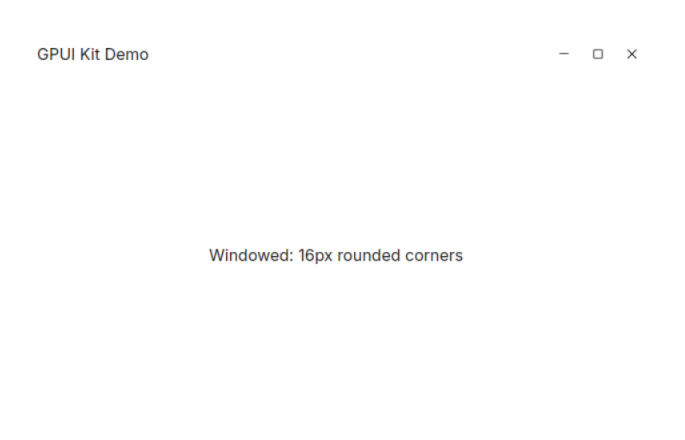
/rust/gpui-kit1.png
白色背景无边框效果演示
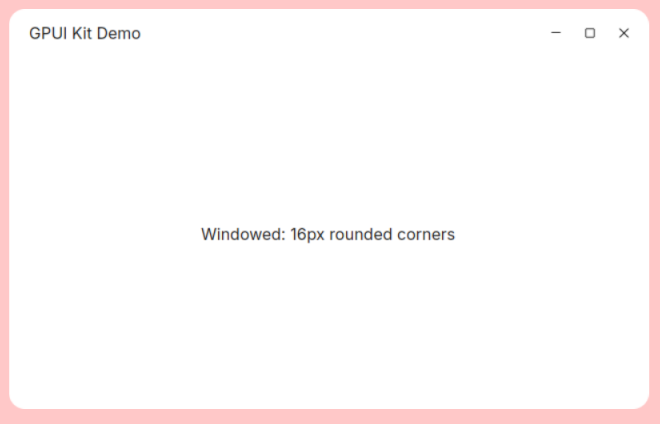
/rust/gpui-kit2.png
粉色背景有边框效果演示
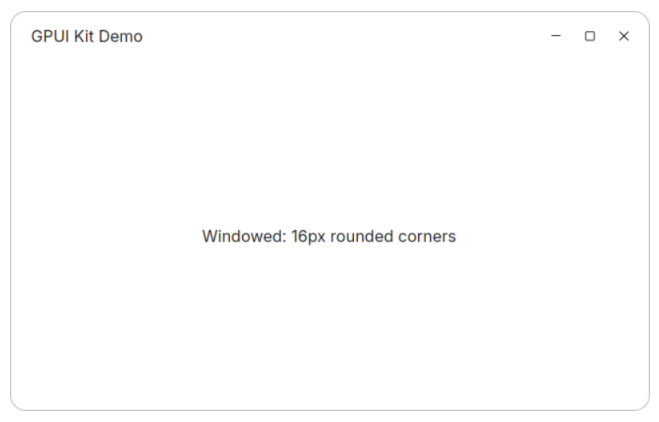
/rust/gpui-kit3.png
白色背景有边框效果演示

1
2
3
4
5
6
7
[package]
name = "gpui-kit-demo"
version = "0.1.0"
edition = "2024"

[dependencies]
gpui-kit = "0.8.0"